





Quotex Demo Account: Free Practice with Virtual Funds
Last updated: 2026-08-22 · Independent guide (unofficial)
The Quotex demo account is the smartest place to start. It's free, needs no deposit, and comes with resettable virtual funds (around US$10,000) so you can learn how the platform works — placing trades, reading charts, testing ideas — without risking a single rupee or dollar. This guide shows how to open the demo, reset the balance, what to practise, and the honest differences between demo and real trading.
Why lead with the demo? Because fixed-time options are high risk, and most people who jump straight to real money lose it. The demo lets you make your beginner mistakes for free.
Try the free demo
The button opens the official Quotex site. No deposit needed to practise.
How to open the Quotex demo account (step by step)
You get the demo automatically when you register — here's the full flow:
-
Create a free account
Sign up on the official Quotex site or app with your email. No deposit and no card are required to get the demo.
-
Select the demo balance
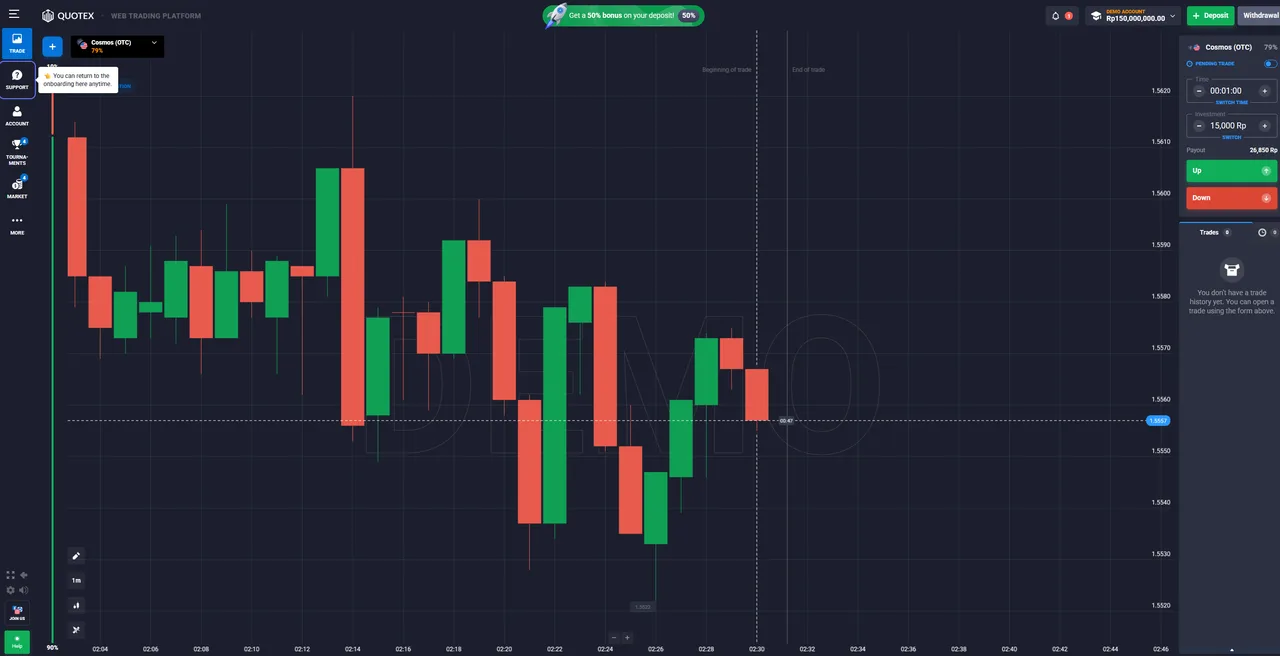
In the traderoom, use the account switch at the top and choose Demo. You'll see virtual funds (around US$10,000) rather than real money.
-
Place practice trades
Pick an asset, set an expiry time and a stake, and predict up or down — exactly like a real trade, but with zero financial risk.
-
Reset the balance when needed
If the virtual balance runs low, you can refill or reset the demo so you can keep practising.
-
Switch to real only when ready
Move to a real account once you consistently understand the platform — not before. The demo is free for as long as you want.
What to practise on the demo
Use the demo to get genuinely comfortable before any real money is involved. Learn where everything is in the traderoom, how to set an expiry time and stake, and how a fixed-time trade resolves. Explore the built-in charting tools and indicators — they can support your analysis, but be clear-eyed that no indicator or tool guarantees a profit. Try trading different assets and times of day, and practise a simple risk-management routine: fixed stake sizes, a limit on trades per session, and a written record of what you did and why.
How the demo differs from a real account
The buttons and mechanics are identical, but two things change on a real account. First, psychology: risking your own money triggers fear and greed that virtual funds don't, and that's where many traders come undone. Second, real conditions: live pricing, payouts and execution apply to actual money. Treat consistent demo results as a sign you're ready to learn with small real stakes — not as proof you'll be profitable.
Resetting the demo balance
If your virtual balance runs low, you can refill or reset the demo and carry on. That's a feature, not a scoreboard — the point is to practise, so reset freely and focus on your process rather than the virtual number.
When (and how) to move to real money
Switch to a real account only once you consistently understand the platform and have a simple, repeatable approach. Even then, start small — the minimum real deposit is from us$ 10 and the minimum trade is around US$1, so you can keep stakes tiny while you adjust to real emotions. Use the account switch at the top of the platform to move between demo and real, and step back to the demo whenever you want to test something new.
Related guides
Frequently asked questions
Is the Quotex demo account free?
Yes. The demo is completely free, needs no deposit and no card, and uses virtual funds — so you can learn the platform at zero financial risk.
How much virtual money does the demo have?
The demo typically starts with around US$10,000 in virtual funds, and it's resettable, so you can refill it and keep practising. The exact figure can vary — check it in your account.
Do I need to deposit to use the demo?
No. You can open an account and use the demo without ever depositing real money. A deposit is only needed if you decide to trade a real account later.
Can I reset the demo balance?
Yes. If the virtual balance runs low you can refill or reset it, which makes the demo a good place to test ideas without worrying about 'running out'.
Is demo trading the same as real trading?
The mechanics are the same, but the psychology isn't. On a real account your own money is at stake, which changes decision-making, and live conditions can differ. Treat consistent demo results as a starting point, not a guarantee.
How long should I practise on the demo?
As long as it takes to understand the interface, order types and risk — there's no cost and no time limit. Only move to real money when you're consistently comfortable, and even then start small.
Can I switch between demo and real?
Yes. Use the account selector at the top of the platform to switch between the demo (virtual funds) and your real account at any time.
Does the demo guarantee I'll make money on real?
No. No amount of demo success guarantees real profits — trading is high risk and most retail accounts lose money. The demo lowers the cost of learning, not the risk of the product.