





Quotex Sign Up: How to Create a Free Account
Last updated: 2026-08-22 · Unofficial
Creating a Quotex account takes about a minute: you register with an email, confirm it, and land straight on a free demo. This guide covers the full Quotex sign up process — how to open an account, when identity verification (KYC) is needed, how to choose between the demo and real account, the minimum first deposit, and how to keep your new account secure.
Two things up front. First, this is an independent, unofficial guide — we link you to the official Quotex site (quotex.io) and never host a registration form. Second, Quotex is a high-risk digital-options platform operated offshore; most retail accounts lose money, so read the risk section before you fund a real account.
Open your free account
The button opens the official Quotex site. New here? You'll start on the free demo — no deposit needed.
How to create a Quotex account (step by step)
The registration flow is the same idea on desktop and mobile — enter an email, confirm it, and you're on the demo in seconds:
-
Open the official Quotex sign-up page
Go to the genuine Quotex website (quotex.io) and open the registration form, or tap Create account in the app. Confirm the address bar shows the real domain over HTTPS first.
-
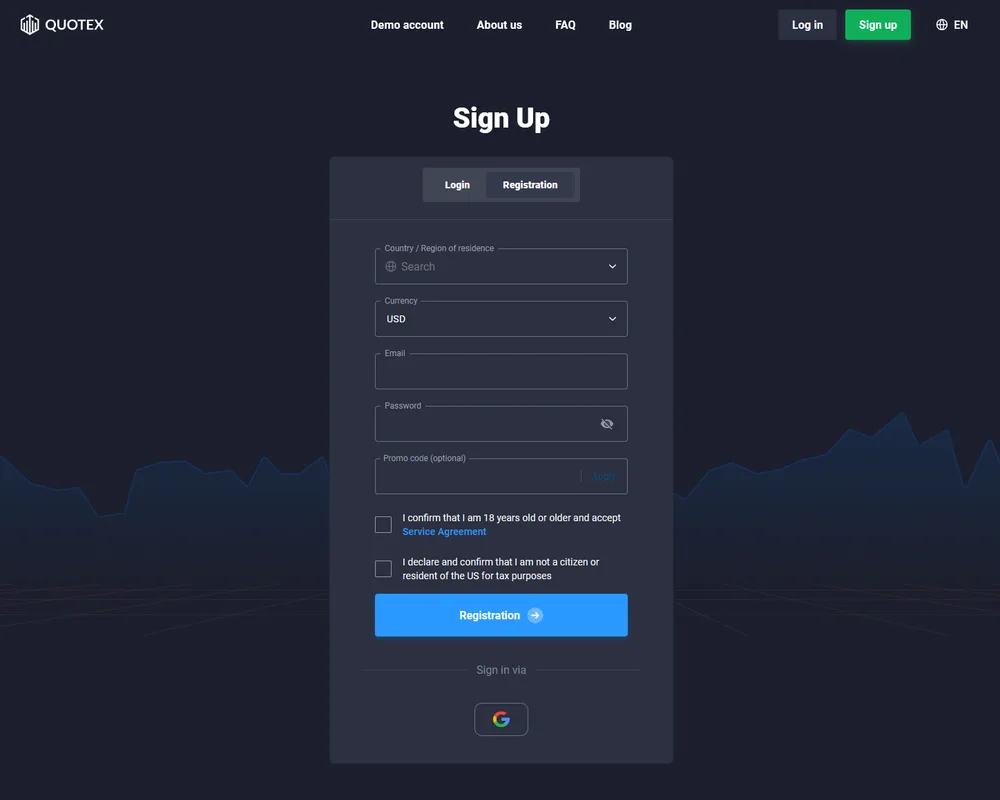
Enter your email and choose a password
Type a working email and pick a strong, unique password. Select your account currency if prompted, and accept the terms only after reading them.
-
Confirm your email
Open the confirmation message Quotex sends and click the verification link. Check spam and promotions if it doesn't appear within a few minutes.
-
Land on the free demo
You'll arrive in the traderoom with a refillable virtual balance — no deposit required. Learn the platform here before risking real money.
-
Switch to real only when ready
Use the account selector to move from Demo to Real. To trade live you make a first deposit from about US$ 10 (varies by region and method).
Register with your email in about a minute
The fastest way to open an account is the email sign-up — often searched as "Quotex register" or "Quotex registration". You provide a working email address, choose a strong password, pick your account currency if the form asks, and agree to the terms. Quotex then sends a confirmation email — click the link inside to activate the account. Use an email you actually control. Quotex also offers a "Sign in via Google" option if you'd rather not create a separate password; either route works, and you'll pick your account currency (for example USD) during sign-up.
Start on the free demo instantly
After you confirm your email, you land on a free demo account with virtual funds and no deposit required — a common example balance is US$ 10,000 virtual (resettable), and it's resettable. Treat the demo as your training ground: learn where the charts, assets and expiry controls are, and practise placing fixed-time trades before risking money. Our demo account guide goes deeper.
Choosing demo vs real
A Quotex account gives you both a demo and a real balance, switched with the account selector at the top of the platform. Stay on demo while you're still learning; there's no rush. Move to real only once you understand the platform and accept that live trading is high risk — the demo can't replicate the pressure of trading your own money, but it lets you master the mechanics first.
Verification and KYC — usually later
You normally do not need to verify your identity just to register or use the demo. KYC checks — typically a government photo ID and sometimes proof of address — are usually requested later, most often around your first withdrawal. Completing verification early, with clear documents that match your details, makes withdrawals smoother. If your account is ever "under review", that's generally a verification or terms matter, not a lost account.
Going live: the minimum deposit
To trade with real money you make a first deposit. The minimum deposit starts from about US$ 10 (varies by region and method), and the minimum trade is from about US$ 1 — so you can start small. You never have to deposit to keep the account; the demo stays free. When ready, our deposit guide walks through the methods and timing.
Country availability
Before you sign up, confirm Quotex is available where you live. Not available in some countries (e.g. the USA and parts of the EU) — the restricted list can change; verify for your country. In India and many regions it commonly supports local payment methods such as UPI, but features and availability can change and are never guaranteed. If access is restricted in your region, registration or funding may simply not work.
Keep your new account secure
- Register only on the official Quotex site or app — check the address bar every time.
- Use a strong, unique password you don't reuse; a password manager helps.
- Enable two-factor authentication (2FA) so a stolen password alone can't unlock your account.
- Never share your password or 2FA codes — genuine support never asks for them.
- Ignore anyone promising to 'manage', 'grow' or 'recover' your account for a fee — that's a scam.
Related guides
Frequently asked questions
How do I sign up for Quotex?
Open the official Quotex site (quotex.io) or app, enter a valid email, choose a strong password, accept the terms, and confirm your email. It usually takes about a minute, and you land on a free demo. This page is an independent guide, not the Quotex registration form itself.
Is creating a Quotex account free?
Yes. Registering and using the demo is free and needs no deposit. You only fund the account later if you decide to trade real money, which starts from a minimum deposit of about US$ 10 (varies by region and method).
Do I need to verify my identity to register?
You can normally register and use the demo without identity verification. KYC checks — usually an ID document and sometimes proof of address — are typically requested later, most often around your first withdrawal rather than at sign-up.
How long does Quotex registration take?
The email sign-up itself takes roughly a minute. You'll be on the demo almost immediately after confirming your email. Later steps like KYC or funding a real account can take longer depending on the method and checks.
Can I open a Quotex account in India?
Quotex is used by traders in many countries and commonly supports local payment methods such as UPI in India, but availability and features can change and are not guaranteed. Quotex is not offered in some countries. Always confirm it's available and permitted for you before signing up.
Should I start on a demo or a real account?
Start on the free demo. It uses resettable virtual funds so you can learn the interface and how fixed-time trading works with no financial risk. Move to real only once you understand the platform and accept that trading is high risk.
Is Quotex safe to sign up with?
Only register on the official Quotex site or app, use a unique password and enable 2FA. Bear in mind Quotex operates offshore and is overseen only by the IFMRRC (a self-regulatory body), not a tier-1 regulator such as the FCA, ASIC or CySEC — so protection is limited and trading is high risk.
Can I have more than one Quotex account?
Brokers typically allow only one account per person, and opening multiple accounts can breach the terms and lead to restrictions. To practise, reset the demo balance instead of creating extra accounts. Check the current terms on the official site.